

Description
Live Each Day with Purpose
Overview
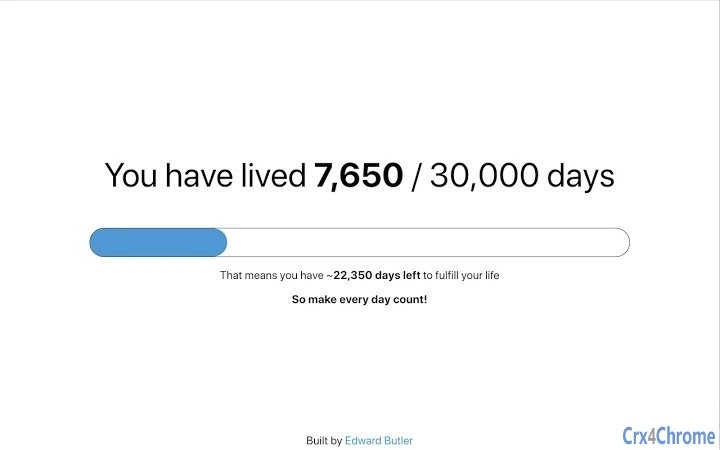
The software is designed as a Chrome browser extension that delivers a daily motivational prompt every time a new window is opened. Its primary purpose is to encourage mindful living by reminding users of the finite nature of time. The concept is rooted in the idea that awareness of time can influence behavior, promoting intentionality in daily choices. This tool is particularly suited for individuals seeking to improve time management, boost personal motivation, or cultivate a more intentional lifestyle.
Target users include students, remote workers, creatives, and anyone interested in personal development. The extension operates passively in the background, requiring no active input after installation. It does not collect or transmit user data, aligning with privacy-focused design principles. Real-world usage scenarios include starting a work session with a reminder to focus on meaningful tasks, or reflecting on personal goals during a morning browsing routine.
The developer did not provide additional background information. Platform compatibility is confirmed for Windows, Mac, and Linux systems. No further details on technical architecture or implementation were disclosed.
Key Features & Capabilities
- Daily Reminder on New Window Open – Triggers a motivational message each time a new Chrome window is launched, reinforcing consistent reflection.
- Time-Aware Messaging – Uses the concept of a 30,000-day lifespan to prompt users to live intentionally and prioritize meaningful activities.
- Non-Intrusive Design – Functions silently in the background without disrupting browsing sessions or consuming significant system resources.
- Browser Integration – Seamlessly integrates with Chrome, requiring no additional software or configuration.
- Privacy-Focused Operation – Does not track user behavior, store data, or access browsing history.
These features support users in maintaining focus, reducing procrastination, and reinforcing long-term goal setting. For example, a student might use the reminder to begin studying with greater purpose, while a remote worker could use it to reset priorities at the start of a new task session. The extension is not designed for task tracking or calendar integration, but rather to serve as a psychological nudge toward mindful decision-making.
User Interface, Workflow & Performance
The user interface is minimal, consisting of a small pop-up message that appears upon opening a new Chrome window. It does not include settings panels, customization options, or visual elements beyond the message itself. Navigation is not required, as the extension operates automatically.
Workflow efficiency is high due to the passive activation mechanism. Users do not need to open a dashboard, configure triggers, or manage notifications manually. The extension runs on startup and activates with each new window, ensuring consistent exposure to the core message.
The developer did not specify resource usage details. Performance observations are based on general software behavior patterns. The extension is expected to have low CPU and RAM impact, given its lightweight nature and lack of background processes. Stability is assumed to be reliable, as the functionality is limited to a single, non-complex trigger event. No reports of crashes or conflicts with other extensions were provided.
Compatibility & System Requirements
The extension is compatible with Windows, Mac, and Linux operating systems. It requires Chrome as the host browser and is designed to function within the Chrome extension ecosystem.
Installation size is 1.5 MB, which is typical for lightweight browser extensions. The developer did not specify exact system requirements such as minimum RAM, processor speed, or disk space. Compatibility information was partially provided.
Pros and Cons
Pros
- Simple, effective reminder system tied to a powerful motivational concept
- Free to use with no hidden costs or ads
- Lightweight and non-intrusive with minimal system impact
- Works across multiple operating systems: Windows, Mac, and Linux
- Privacy-focused with no data collection or tracking
Cons
- Limited customization options for the reminder message
- No ability to disable or modify the trigger frequency
- Dependent on Chrome browser; not available for other browsers
- Message content cannot be personalized or updated by the user
- Does not integrate with calendars, task managers, or productivity tools
FAQ Section
Is this extension available for browsers other than Chrome?
Currently, the extension is only available for Chrome. There is no official support for Firefox, Edge, or other browsers.
Does this extension collect any personal data?
No, the extension does not collect, store, or transmit user data. It operates in a privacy-preserving manner without accessing browsing history or user behavior.
How often does the reminder appear?
The reminder appears once each time a new Chrome window is opened. There is no option to change the frequency or disable it entirely.
Is the extension free to use?
Yes, the extension is completely free. No premium features, subscriptions, or in-app purchases are available.
Can I update the reminder message or customize it?
Currently, the message is fixed and cannot be modified by the user. The content is set at the time of development and remains unchanged.
Final Thoughts
This Chrome extension offers a unique approach to personal motivation by embedding a daily reminder of life’s impermanence into a routine browsing action. Its strength lies in simplicity and consistency—users are gently prompted to reflect on their time with each new window, fostering a mindset of intentionality. While it lacks advanced customization or integration features, its minimalist design ensures reliability and low overhead.
It is best suited for individuals who value self-awareness, time management, and personal growth. Those seeking a subtle yet powerful tool to stay focused and motivated will find this extension effective. It is not a productivity tracker or task manager, but rather a behavioral nudge that encourages better choices over time.
Download Live Each Day with Purpose now and start living each day with intention.
Guides & Tutorials for 30K Extension for Chrome
How to install 30K Extension for Chrome
- Click the Preview / Download button above.
- Once redirected, accept the terms and click Install.
- Wait for the 30K Extension for Chrome download to finish on your device.
How to use 30K Extension for Chrome
This software is primarily used for its core features described above. Open the app after installation to explore its capabilities.
User Reviews for 30K Extension for Chrome 0
No reviews found





